Check for the intended job
Choose cut-out shapes, drawing or scoring lines, or digital artwork. Open paths can be appropriate for a drawn line while needing closer attention for a cut-out piece.
Understand what is inside your SVG.
Before sending a vector file into another app, look for live text, embedded pictures, repeated shapes and other details that may need attention. Compare changes with the original and keep the version you need.
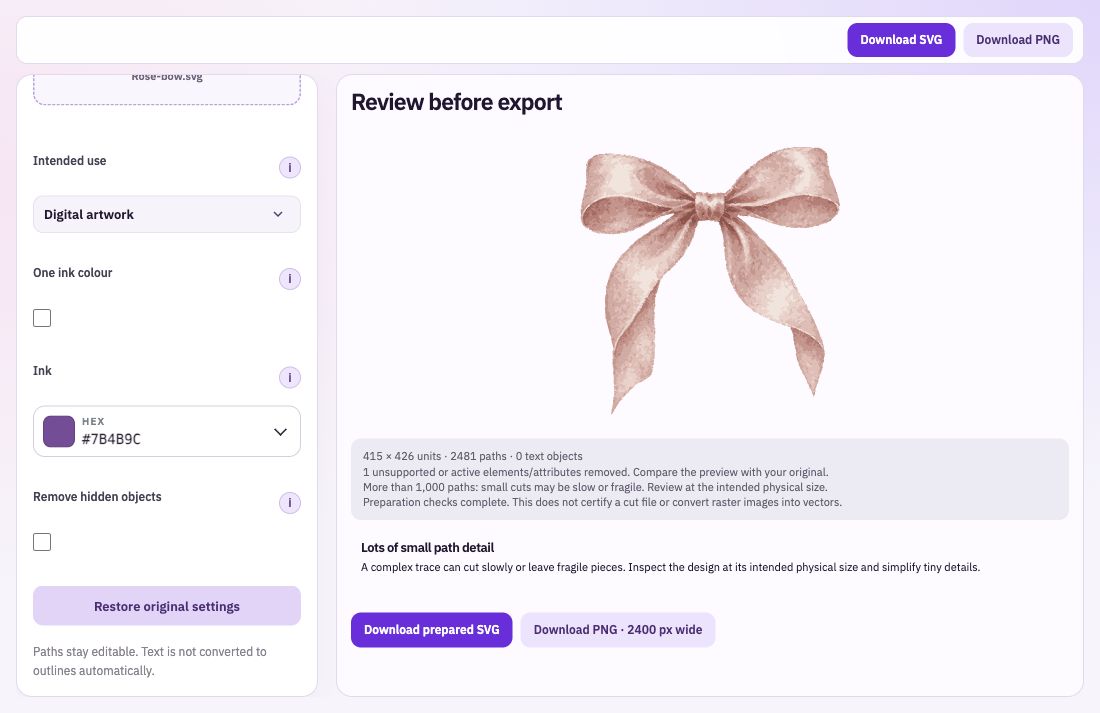
Choose cut-out shapes, drawing or scoring lines, or digital artwork. Open paths can be appropriate for a drawn line while needing closer attention for a cut-out piece.
Review the findings, optionally remove explicitly hidden objects or apply one ink colour. The preview removes active and external content before displaying the file.
Compare the artwork after changing the settings. Download the prepared SVG with its remaining content, or a PNG preview when you need an image version.
Choose the file and the purpose you intend for it. Read the structural findings alongside the visible drawing.
Try one ink colour or remove hidden objects where appropriate. Compare the preview carefully, especially with gradients, masks or fine details.
Download the prepared SVG and open it in your destination app. Keep the original so you can recover an element you decide you still need.
Use the findings to understand what needs attention. Text is not automatically converted into outlines, and an SVG still needs checking in the app or machine workflow where it will be used. Keep the visible result and the intended output in view together.
Bring: An existing SVG.
Download: SVG or PNG.
Import your SVG. Review the findings and choose changes. Download the result and verify it in the destination app.